
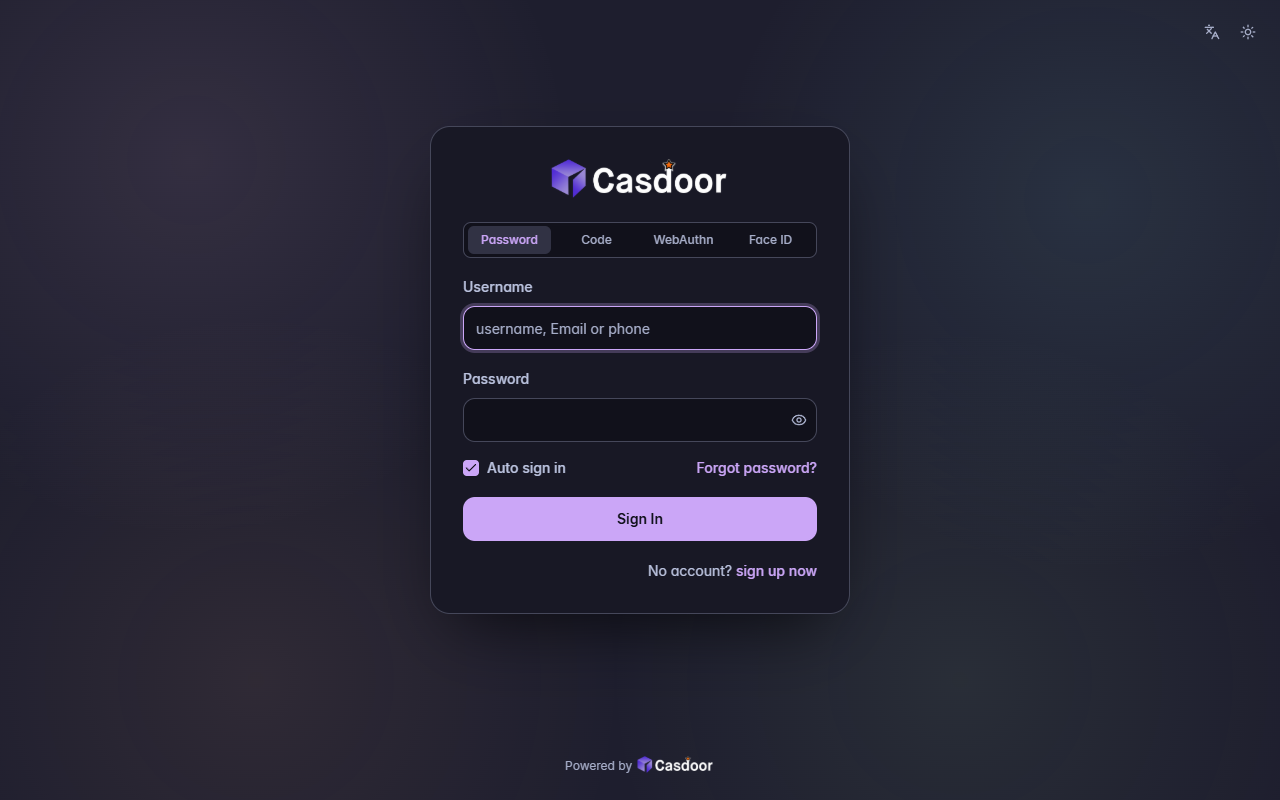
会改哪些设置
| 主题 | dark |
|---|---|
| 圆角 | 8px |
| 表单位置 | 居中 |
| 表单CSS | 是 |
| 表单CSS(移动端) | 是 |
这些都在 Casdoor 应用的 界面定制 标签页里,套用主题之后还可以继续调整。
套用到应用
- 在下面填好应用,调整主题的设置,然后复制 JSON。
- 在 Casdoor 控制台打开 应用,编辑这个应用,点击顶部的 导入JSON,粘贴 JSON 后点 确定。
- 点击 保存。下次打开登录页时就会用上这个主题。
{
  "name": "<应用名称>",
  "organization": "<组织>",
  "themeData": {
    "themeType": "dark",
    "colorPrimary": "#cba6f7",
    "borderRadius": 8,
    "isCompact": false,
    "isEnabled": true
  },
  "formOffset": 2,
  "formCss": "<style>\n.login-background {\n  color-scheme: dark;\n  --background: 240 21% 15%;\n  --foreground: 226 64% 88%;\n  --card: 240 21% 12%;\n  --card-foreground: 226 64% 88%;\n  --popover: 240 21% 12%;\n  --popover-foreground: 226 64% 88%;\n  --muted: 237 16% 23%;\n  --muted-foreground: 228 24% 72%;\n  --accent: 237 16% 23%;\n  --accent-foreground: 226 64% 88%;\n  --border: 234 13% 31%;\n  --input: 234 13% 31%;\n  --ring: 226 64% 88%;\n  font-family: Inter, ui-sans-serif, system-ui, -apple-system, 'Segoe UI', sans-serif;\n  background: #1e1e2e;\n}\n.login-background > div:first-of-type,\n.login-content,\n#footer {\n  position: relative;\n  z-index: 1;\n}\n.login-background::before {\n  content: '';\n  position: fixed;\n  inset: 0;\n  background: radial-gradient(circle at 15% 20%, rgba(245, 194, 231, 0.10) 0, transparent 30%), radial-gradient(circle at 85% 25%, rgba(137, 220, 235, 0.10) 0, transparent 30%), radial-gradient(circle at 75% 85%, rgba(166, 227, 161, 0.08) 0, transparent 30%), radial-gradient(circle at 20% 85%, rgba(250, 179, 135, 0.08) 0, transparent 30%);\n}\n.login-content > div {\n  max-width: 420px;\n}\n.login-panel {\n  border: 1px solid #45475a;\n  border-radius: 14px;\n  background: #181825;\n  box-shadow: 0 30px 70px -24px rgba(0, 0, 0, 0.7);\n}\n.login-background > div:first-of-type button {\n  color: #a6adc8;\n}\n.signin-methods > div {\n  border: 1px solid #45475a;\n  background: #11111b;\n}\n.signin-methods [role='tab'] {\n  color: #a6adc8;\n}\n.signin-methods [role='tab'][data-state='active'] {\n  background: #313244 !important;\n  color: #cba6f7;\n  box-shadow: none !important;\n}\n.login-form label {\n  color: #bac2de;\n  font-weight: 500;\n}\n.login-form input:not([type='checkbox']):not([type='radio']) {\n  height: 44px;\n  border: 1px solid #45475a;\n  border-radius: 8px;\n  background: #11111b;\n  color: #cdd6f4;\n  box-shadow: none;\n}\n.login-form input:not([type='checkbox']):not([type='radio'])::placeholder {\n  color: #a6adc8;\n}\n.login-form input:not([type='checkbox']):not([type='radio']):focus {\n  border-color: #cba6f7;\n  box-shadow: 0 0 0 3px color-mix(in srgb, #cba6f7 25%, transparent);\n}\n.login-password button {\n  color: #a6adc8;\n}\n.login-form [role='checkbox'] {\n  border-color: #a6adc8;\n  border-radius: 4px;\n}\n.login-form [role='checkbox'][data-state='checked'] {\n  background: #cba6f7;\n  border-color: #cba6f7;\n  color: #11111b;\n}\n.login-form a {\n  color: #cba6f7;\n  font-weight: 500;\n}\n.login-form .login-button {\n  height: 44px;\n  border-radius: 8px;\n  background: #cba6f7;\n  color: #11111b;\n  font-weight: 600;\n  box-shadow: none;\n}\n.login-form .login-button:hover {\n  background: #cba6f7;\n  filter: brightness(1.08);\n}\n.login-form .login-signup-link,\n.login-form .login-forget-password label {\n  color: #bac2de;\n}\n#footer {\n  color: #a6adc8;\n}\n\n.login-panel {\n  border-radius: 20px;\n}\n.login-form input:not([type='checkbox']):not([type='radio']),\n.login-form .login-button {\n  border-radius: 12px;\n}\n.login-form .login-forget-password {\n  width: 100%;\n}\n</style>",
  "formCssMobile": "<style>\n.login-background {\n  color-scheme: dark;\n  --background: 240 21% 15%;\n  --foreground: 226 64% 88%;\n  --card: 240 21% 12%;\n  --card-foreground: 226 64% 88%;\n  --popover: 240 21% 12%;\n  --popover-foreground: 226 64% 88%;\n  --muted: 237 16% 23%;\n  --muted-foreground: 228 24% 72%;\n  --accent: 237 16% 23%;\n  --accent-foreground: 226 64% 88%;\n  --border: 234 13% 31%;\n  --input: 234 13% 31%;\n  --ring: 226 64% 88%;\n  font-family: Inter, ui-sans-serif, system-ui, -apple-system, 'Segoe UI', sans-serif;\n  background: #1e1e2e;\n}\n.login-background > div:first-of-type button {\n  color: #a6adc8;\n}\n.signin-methods > div {\n  border: 1px solid #45475a;\n  background: #11111b;\n}\n.signin-methods [role='tab'] {\n  color: #a6adc8;\n}\n.signin-methods [role='tab'][data-state='active'] {\n  background: #313244 !important;\n  color: #cba6f7;\n  box-shadow: none !important;\n}\n.login-form label {\n  color: #bac2de;\n  font-weight: 500;\n}\n.login-form input:not([type='checkbox']):not([type='radio']) {\n  height: 44px;\n  border: 1px solid #45475a;\n  border-radius: 8px;\n  background: #11111b;\n  color: #cdd6f4;\n  box-shadow: none;\n}\n.login-form input:not([type='checkbox']):not([type='radio'])::placeholder {\n  color: #a6adc8;\n}\n.login-form input:not([type='checkbox']):not([type='radio']):focus {\n  border-color: #cba6f7;\n  box-shadow: 0 0 0 3px color-mix(in srgb, #cba6f7 25%, transparent);\n}\n.login-password button {\n  color: #a6adc8;\n}\n.login-form [role='checkbox'] {\n  border-color: #a6adc8;\n  border-radius: 4px;\n}\n.login-form [role='checkbox'][data-state='checked'] {\n  background: #cba6f7;\n  border-color: #cba6f7;\n  color: #11111b;\n}\n.login-form a {\n  color: #cba6f7;\n  font-weight: 500;\n}\n.login-form .login-button {\n  height: 44px;\n  border-radius: 8px;\n  background: #cba6f7;\n  color: #11111b;\n  font-weight: 600;\n  box-shadow: none;\n}\n.login-form .login-button:hover {\n  background: #cba6f7;\n  filter: brightness(1.08);\n}\n.login-form .login-signup-link,\n.login-form .login-forget-password label {\n  color: #bac2de;\n}\n#footer {\n  color: #a6adc8;\n}\n\n.login-panel {\n  border-radius: 20px;\n}\n.login-form input:not([type='checkbox']):not([type='radio']),\n.login-form .login-button {\n  border-radius: 12px;\n}\n.login-form .login-forget-password {\n  width: 100%;\n}\n</style>"
}更多登录主题
查看全部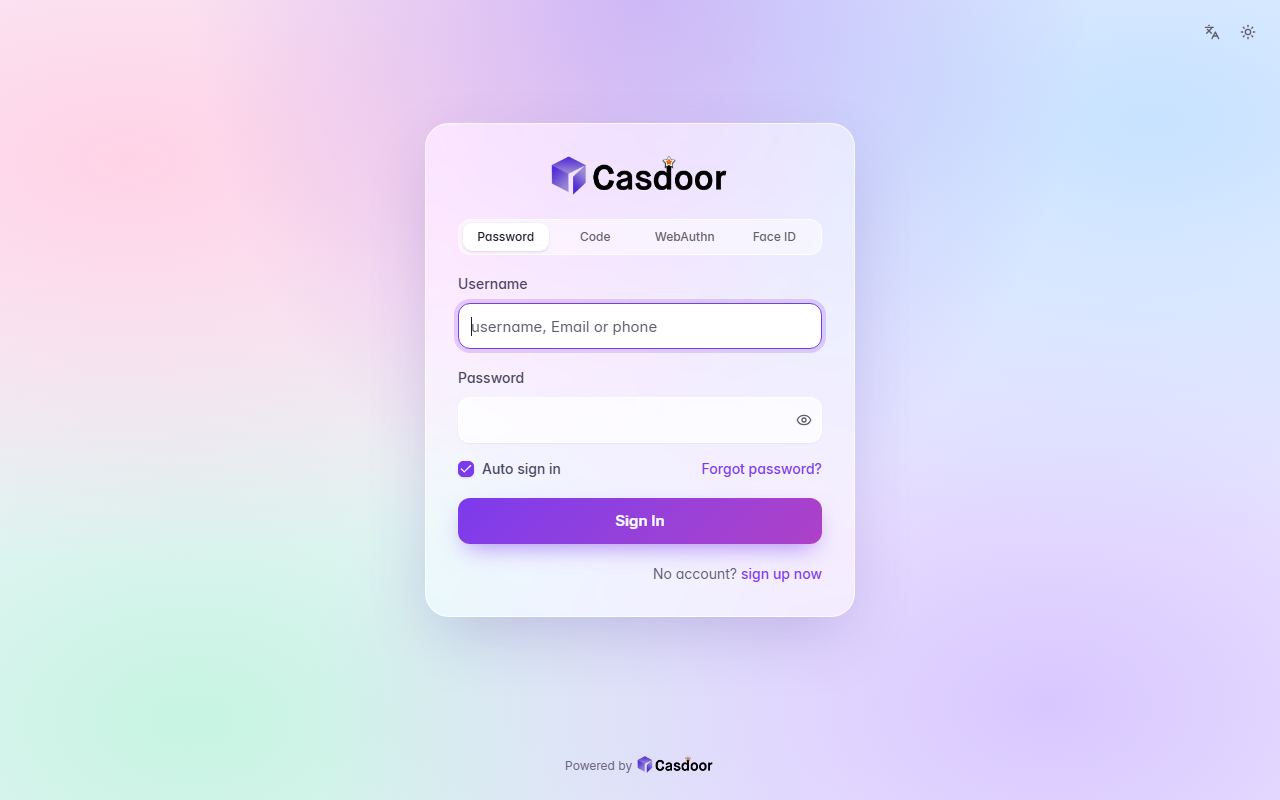
Aurora
登录主题A pastel mesh of color tinted by your accent behind a frosted glass card, with soft rounded fields and a gradient button. CSS only, so organization admins can install it.
浅色毛玻璃渐变
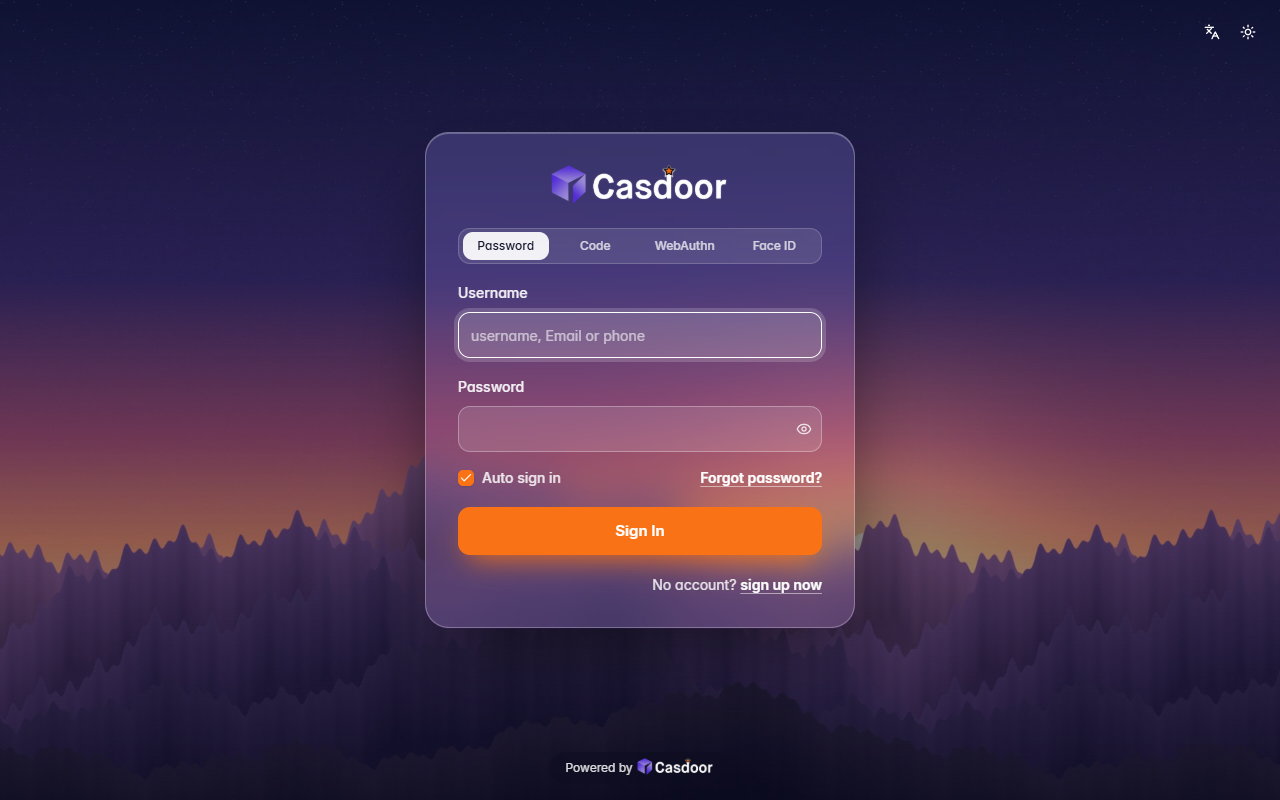
Backdrop
登录主题Your own picture behind the whole page, dimmed a little, with a frosted glass card on top. It comes with a dusk mountain scene; give it any image address to use yours. Organization admins can install it.
深色背景图毛玻璃
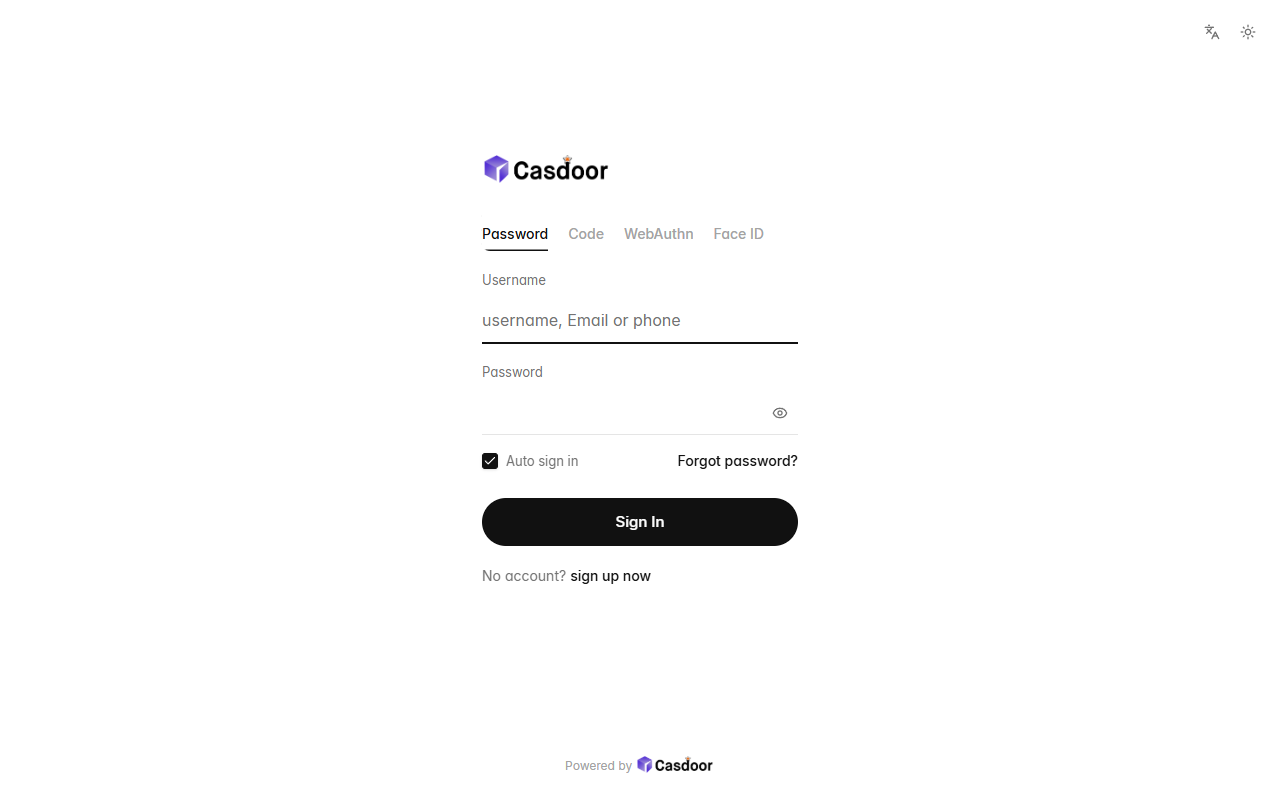
Bare
登录主题Nothing but the form: no card, no background, a small left-aligned logo, quiet text tabs, hairline fields and a round button, with plenty of white space. CSS only, so organization admins can install it.
浅色极简无卡片